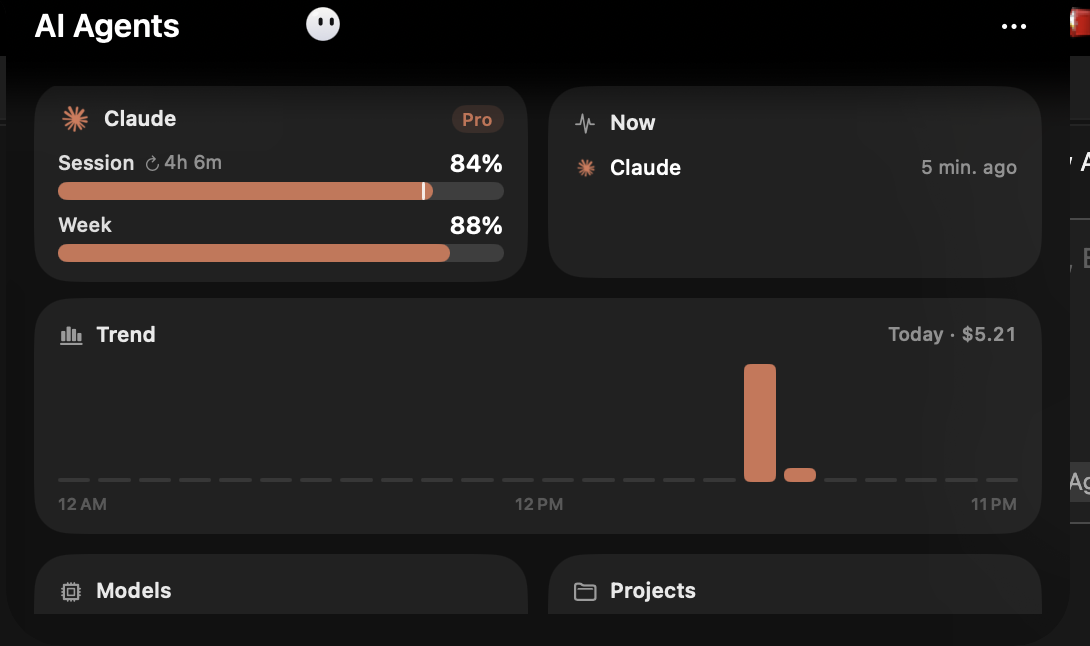
I run Vorssaint on my MacBook Air. Among a long list of other things, it gives the notch a Dynamic Island, and the island has an AI Agents panel that follows Claude Code: plan limits, what's running right now, and what today would have cost on the API.
One afternoon I opened it and saw this: Session 98%, Week 89%. On a Pro plan, with most of the week still ahead of me. Either I'd had a much more productive morning than I remembered, or something was reading the wrong file.
So I asked Claude Code to find out why. This is what it found, and the small hook we added so the island stays current.
Where the numbers come from
I assumed Vorssaint worked out the limits from Claude Code's own logs in ~/.claude/projects. Partly true. Those logs give it tokens, models and projects, which is where the “API value” and the trend chart come from. But the logs don't contain your plan limits. Those live on Anthropic's side.
Running strings on the app binary turned up one telling path:
Library/Application Support/Claude/plan-usage-history.jsonThat file belongs to the Claude desktop app, not Claude Code. The desktop app fetches your plan usage and writes a small history of samples there. Vorssaint just reads it. Mine looked like this (org id trimmed):
{"version":2,"samples":[
  {"t":1791458857502,"org":"…","u":{"fh":23,"sd":3}},
  {"t":1791460185757,"org":"…","u":{"fh":23,"sd":3}},
  {"t":1792324605558,"org":"…","u":{"fh":2,"sd":11}}
]}
fh is the five-hour session window and sd is the seven-day window. Both are the percentage used. The newest sample said I'd used 2% of my session and 11% of my week.
Bug one: there was no bug
Now do the arithmetic:
- 100 − 2 = 98, the Session number on the island
- 100 − 11 = 89, the Week number
The island was showing how much I had left. A nearly full orange bar means “you've barely started”, not “slow down”. The binary has both %@ left and %@ used strings and a notchAgentsLimitDisplay setting I'd never touched, so it looks like a display preference. I just hadn't read the bar the way it was meant to be read.
The screenshot at the top is from later the same day: 85% session and 87% week remaining. The bars go down as you work, like a fuel gauge.
Bug two: the numbers were ten days old
Look at the timestamps again. The first two samples are from October 8. The third is from the day I looked, written a few minutes before I opened the island. Nothing in between.
The desktop app only writes a sample when it's open and decides to refresh. I live in the terminal, so the desktop app mostly isn't open. For ten days, the island would have shown whatever the last sample said, however much I'd used since.
I wanted the island to follow Claude Code, since that's where my usage actually happens.
Claude Code already has the numbers
Claude Code's status line is a shell command that gets a JSON blob on stdin after every response. For subscribers, that blob includes the live limits:
"rate_limits": {
  "five_hour": { "used_percentage": 2,  "resets_at": 1792342000 },
  "seven_day": { "used_percentage": 11, "resets_at": 1792800000 }
}
Same two numbers, same meaning, updated on every turn. All that was missing was getting them into the file Vorssaint already reads.
The hook
A small script reads the status line JSON, pulls out the two percentages and appends a sample to the desktop app's file in its own format:
#!/bin/bash
# ~/.claude/vorssaint-sync.sh
# Feeds Claude Code's live rate limits (from statusline JSON on stdin) into the
# Claude desktop plan-usage file that Vorssaint's Dynamic Island reads.
F="$HOME/Library/Application Support/Claude/plan-usage-history.json"
input=$(cat)
fh=$(echo "$input" | jq -r '.rate_limits.five_hour.used_percentage // empty | round')
sd=$(echo "$input" | jq -r '.rate_limits.seven_day.used_percentage // empty | round')
[ -z "$fh" ] && [ -z "$sd" ] && exit 0
[ -f "$F" ] || exit 0

now=$(($(date +%s) * 1000))
tmp="$F.tmp.$$"
jq --argjson t "$now" --arg fh "$fh" --arg sd "$sd" '
  (.samples[-1] // {}) as $last
  | ($last.u // {}) as $lu
  | {fh: (if $fh == "" then $lu.fh else ($fh|tonumber) end),
     sd: (if $sd == "" then $lu.sd else ($sd|tonumber) end)} as $u
  # skip if unchanged and written within the last minute
  | if ($u == $lu) and (($t - ($last.t // 0)) < 60000) then empty
    else .samples = ((.samples + [{t: $t, org: $last.org, u: $u}]) | .[-500:])
    end
' "$F" > "$tmp" 2>/dev/null && [ -s "$tmp" ] && mv "$tmp" "$F"
rm -f "$tmp"
A few choices in there that are deliberate:
- It reuses the existing org id from the last sample instead of looking it up. If the file doesn't exist yet, it does nothing. Open the desktop app once to create it.
- It writes to a temp file and moves it into place, so Vorssaint never reads a half-written file.
- It skips duplicates. If nothing changed and the last sample is under a minute old, it writes nothing.
- It keeps only the last 500 samples, so the file doesn't grow forever.
Then one change at the start of my existing status line command in ~/.claude/settings.json:
input=$(cat); (echo "$input" | ~/.claude/vorssaint-sync.sh >/dev/null 2>&1 &); ...the rest of my status lineIt runs in the background, so the status line doesn't wait for it, and its output goes nowhere, so it can't break what the status line prints.
What it doesn't do
- It only updates while Claude Code is getting responses. Chatting on claude.ai while the terminal sits idle won't move the island until the next Claude Code turn.
- It's writing into another app's file. The desktop app and the hook use the same format, so they get along, but if a future desktop update changes the schema, this needs a look. I kept backups of both files, just in case.
- The “API value” on the island is still what today's tokens would cost at public API prices. It's not a bill, and it won't match anything on your Pro plan.
The actual lesson
Half of this was a fix and half was me misreading a progress bar. When a dashboard number looks wrong, the cheapest check is whether it's the inverse of the number you expected. Then ask how old it is.